While you record CinemaDNG, it writes the two files Gyroflow needs into the
clip's own folder: a .gcsv motion log and a .json lens profile.
Current version v1.14.0. Still being tested — test it before you shoot
something important.
錄 CinemaDNG 的同時,它會把 Gyroflow 要的兩個檔案寫進片子自己的資料夾:
.gcsv 運動記錄和 .json 鏡頭 profile。
目前版本 v1.14.0。仍在測試中 —— 拍重要的東西之前先測過。
SIGMA fp (not fp L) on firmware Ver.5.02 exactly. How to check.
SIGMA fp(不是 fp L),韌體必須剛好是 Ver.5.02。怎麼確認。
Open fpSup-Merge with fpSup-Gyro ticked. You can add OG3K or OG2K on the same card. You cannot add fpSup-Gyro-Base: the two hook the same places in the firmware. Then download the zip.
打開已勾好 fpSup-Gyro 的 fpSup-Merge。 同一張卡可以再加 OG3K 或 OG2K。 不能跟 fpSup-Gyro-Base 一起用: 兩者掛在韌體裡同樣的位置。然後下載 zip。
Fast Start 2 is an option on the same page. See How to use fpSup.
Fast Start 2 是同一頁上的選項,見 fpSup 怎麼用。
Unzip. Copy AutoRun.txt, fpSup.BIN and the
FPSUPUI folder to the top level of the SD card the camera boots
from. Do not put them in a folder. Details.
解壓縮。把 AutoRun.txt、fpSup.BIN 和
FPSUPUI 資料夾複製到相機開機用那張 SD 卡的最上層。
不要放進資料夾裡。細節。
Unplug the USB cable and turn the camera on. The fpSup logo appears in the top left and four boxes fill one by one. All four white = loaded. The camera's own screen comes back two seconds later. If the boxes stop filling, the load stopped there — see below.
拔掉 USB 線,開機。左上角會出現 fpSup 標誌,四個方格一個一個填滿。 四格全白 = 載入完成。兩秒後相機原本的畫面會回來。 如果方格停住不再填,載入就是停在那裡 —— 見下面。
There is no menu and nothing to turn on. No folder to make, nothing to convert.
沒有選單,也沒有東西要開。不用建資料夾,不用轉換任何東西。
| you need你需要 | why為什麼 |
|---|---|
| CinemaDNG recording用 CinemaDNG 錄影 | A MOV take gets no files. MOV records through a different path this build does not hook. For MOV use fpSup-Gyro-Base.用 MOV 拍不會有這些檔案。 MOV 走的是另一條路徑,這個版本沒有掛在那裡。要錄 MOV 請用 fpSup-Gyro-Base。 |
| A fast enough card夠快的卡 | The files are written while you record, on the same card as the video. If the card is struggling, the gyro files are the first thing to go missing or come out incomplete. You still get the clip.這些檔案是在錄影的同時、寫在跟影片同一張卡上。 卡在吃力的時候,陀螺儀檔案會第一個不見或不完整。片子你還是有。 |
| A lens with electronic contacts有電子接點的鏡頭 | Only for the .json. The camera makes it from its own
calibration data for the mounted lens. The .gcsv does not need
it.只有 .json 需要。
相機是用它對掛上那顆鏡頭的校正資料做出來的。.gcsv 不需要。 |
Record as usual. While you record, two files are written inside the clip's own folder:
照平常錄。錄影的同時,片子自己的資料夾裡會寫出兩個檔案:
\CINEMA\A001_037\A001_037.gcsv | the motion log運動記錄 |
\CINEMA\A001_037\A001_037.json | the lens profile鏡頭 profile |
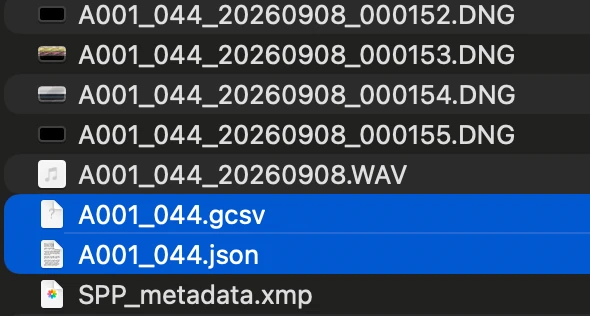
The log holds every sample the gyro produced, at 2499.466 Hz, nothing averaged. Each accelerometer reading sits on the row of the gyro sample it followed. The profile carries the mounted lens's own distortion — the same curve the camera puts in a DNG.
記錄裡是陀螺儀產生的每一個樣本,2499.466 Hz,沒有平均。 每一筆加速度計讀數放在它之後那個陀螺儀樣本的那一列。 profile 帶的是掛上那顆鏡頭自己的畸變 —— 跟相機寫進 DNG 的是同一條曲線。
In Gyroflow, load the frames and both files, then run the sync.
在 Gyroflow 裡載入影格和那兩個檔案,然後執行同步。
You cannot skip the sync, and you cannot reuse a number from last time. CinemaDNG has no timecode, and the log starts about half a second after the first frame — between 470 and 570 ms, and different in every take.
同步不能跳過,也不能沿用上次的數字。 CinemaDNG 沒有時間碼,而記錄的起點比第一個影格晚大約半秒 —— 落在 470 到 570 ms 之間,而且每一次拍攝都不一樣。
Gyroflow asks for a frame rate when you give it a DNG sequence. Enter the rate you recorded at — it cannot read that from the frames.
你把 DNG 序列丟給 Gyroflow 時,它會問你格率。 填你錄影時用的那個 —— 它沒辦法從影格裡讀出來。
There is a Gyroflow plugin for Resolve, so you can stabilise on the timeline instead of exporting from Gyroflow first. It reads the same two files.
Resolve 有 Gyroflow 的外掛,所以你可以直接在時間軸上穩定, 不用先從 Gyroflow 匯出。它讀的是同樣那兩個檔案。
The camera may not know the lens, or may report the wrong one. The
.json is then wrong, and Gyroflow corrects the picture for a lens you
are not using. The .gcsv is not affected.
相機可能不認得那顆鏡頭、或回報成錯的那一顆。
那樣 .json 就是錯的,Gyroflow 會照一顆你沒在用的鏡頭去修正畫面。
.gcsv 不受影響。
What to do: do not use the .json. Use Gyroflow's own lens
calibration: film a calibration target, and Gyroflow works out your lens's real
distortion and saves a profile you can reuse for that lens.
怎麼辦:不要用那個 .json,改用 Gyroflow 自己的鏡頭校正:
拍一張校正圖卡,Gyroflow 會算出你鏡頭真正的畸變,存成 profile,以後那顆鏡頭都能重複用。
Nothing to do. In CINE the camera records every frame landscape upright, so Gyroflow reads a portrait take like any other: load, sync, stabilise, and turn the picture at the end of the edit. Leave horizon lock off. Photographs are not touched and still rotate by themselves.
不用做任何事。在 CINE 模式下,相機每一格都以橫向正立記錄, 所以 Gyroflow 讀直拍跟讀其他素材一樣:載入、同步、穩定,剪輯最後再把畫面轉過來。 水平鎖定維持關閉。照片不受影響,照樣會自己旋轉。
| tested測過 | not covered不包含 / 沒處理 |
|---|---|
| CinemaDNG to the SD card and to an external SSDCinemaDNG 錄到 SD 卡與外接 SSD | MOV: no files are writtenMOV:不會寫出檔案 |
| Portrait takes read correctly in Gyroflow直拍在 Gyroflow 裡讀得正確 | Power lost during a take: the files are left short, and nothing repairs them at the next start錄影中斷電:檔案會不完整,下次開機不會修補 |
| At a normal power-off the card writes back every firmware word it changed, so the camera switches off stock (new in v1.14.0)正常關機時,卡會把它改過的每個韌體字寫回去, 所以相機關機時是原廠狀態(v1.14.0 新增) | Battery pulled without a normal power-off: the write-back does not run, and the changes can stay in memory until the next cold start沒有正常關機就拔電池:寫回不會執行, 改動可能留在記憶體裡,直到下一次冷開機 |
The full notes are in the release README.txt. Record something you do not need and check it before you record something you do.
完整說明在發行版的 README.txt。 先錄一段你不需要的東西、檢查它,再去錄你真正需要的。
fpSup-Gyro has no menu setting, so there is nothing to set back first. Delete
AutoRun.txt, fpSup.BIN and FPSUPUI from the card, or
take the card out, then switch the camera off. At power-off the card writes back every
firmware word it changed. Nothing is flashed.
fpSup-Gyro 沒有選單設定,所以不用先改回任何東西。
把卡上的 AutoRun.txt、fpSup.BIN 和 FPSUPUI 刪掉,
或把卡拿出來,然後關機。關機時卡會把它改過的每個韌體字寫回去。沒有任何東西被燒錄。
If the camera froze, unplug USB and take the battery out. More on removing.
如果相機凍住了,拔掉 USB、把電池拿出來。 移除的更多說明。
If you combined it with OG3K or OG2K, follow the removal steps for that product first — its resolution is a menu setting.
如果你跟 OG3K 或 OG2K 合在一起用,先照那個產品的移除步驟做 —— 它的解析度是選單設定。
| what happens發生什麼 | what to do怎麼辦 |
|---|---|
| No logo or boxes when the camera starts開機時沒有標誌或方格 | The card did not run. Check the three items are at the top level of the card and the card's lock switch is off. General problems.卡片沒有執行。確認三樣東西都在卡的最上層, 卡片的鎖扣是關的。一般問題。 |
| The boxes stop filling方格停住不再填 | The load stopped there. Build the card again instead of reusing it, and bring what you saw to the Discord.載入停在那裡。重做一張卡, 不要沿用原本那張,把你看到的畫面帶到 Discord 上問。 |
No .gcsv in the clip folder片子資料夾裡沒有 .gcsv |
Check the take is CinemaDNG, not MOV. Check all four boxes filled at
start-up. If both are fine, the card is probably too slow: these files are
written while you record, and a slow card loses them first.確認這段是 CinemaDNG 而不是 MOV。
確認開機時四個方格都填滿了。 兩者都沒問題的話,多半是卡太慢:這些檔案是在錄影的同時寫的, 卡一慢,它們會第一個不見。 |
The .gcsv is shorter than the clip.gcsv 比片子短 |
The card could not keep up, or power was lost during the take. Nothing repairs it later.卡跟不上,或錄影中斷電。之後不會自動修補。 |
| Gyroflow cannot line the motion up with the pictureGyroflow 對不齊運動和畫面 | Run the sync, every take. The offset is 470–570 ms and changes each time. Also check the frame rate you entered matches the one you recorded at.每一段都要執行同步。偏移是 470–570 ms,每次都不一樣。 另外確認你填的格率跟錄影時的一樣。 |
| Gyroflow stabilises, but the picture looks bent or stretchedGyroflow 穩定了,但畫面看起來彎掉或被拉伸 | The lens profile does not match your lens. This happens with adapters and
manual lenses. Use Gyroflow's own lens calibration instead of the
.json — Use.鏡頭 profile
跟你的鏡頭對不上。用轉接環和手動鏡頭時會這樣。改用 Gyroflow 自己的鏡頭校正,不要用那個 .json ——
見使用。 |
| The camera does not respond at all相機完全沒反應 | Unplug USB and take the battery out. Nothing is flashed.拔掉 USB、把電池拿出來。沒有任何東西被燒錄。 |