← fpSup

How to use it怎麼用

This page takes you from an empty SD card to a loaded camera, and back. It is the same for every product. What to do once it is loaded is on each product's own page.

這一頁帶你從一張空白記憶卡走到一台載入好的相機,再回到原狀。 這些步驟每個產品都一樣。載入之後怎麼用,在每個產品自己的頁面上。

product產品what it does做什麼
fpSup-OG3K Open gate 3K: the full 3:2 sensor at 3024×2010 CinemaDNG. Needs an external SSD.Open gate 3K:完整 3:2 感光元件,3024×2010 CinemaDNG。需要外接 SSD。
fpSup-OG2K Open gate 2K: the same 3:2 view at 2016×1344, at about the camera's own FHD data rate.Open gate 2K:同樣的 3:2 視野,2016×1344,資料量約等於相機自己的 FHD。
fpSup-Gyro Gyroflow motion files (.gcsv + .json) written next to each CinemaDNG clip.在每段 CinemaDNG 片子旁邊寫出 Gyroflow 運動檔(.gcsv + .json)。
fpSup-Gyro-Base The gyro as one raw .GYR per take, converted afterwards in your browser.每段拍攝寫一個原始 .GYR,之後在瀏覽器裡轉換。
fpSup-RAW-View An LCD view that shows what the 12-bit CinemaDNG will record. Test build.讓 LCD 顯示 12-bit CinemaDNG 實際會錄到的範圍。測試版。
Steps 3 and 4 need a computer. You have to copy files onto an SD card. A phone cannot do this. If you are reading on a phone, read to the end now, then come back when you have a computer and a card reader. 第 3、4 步需要電腦。你得把檔案複製到記憶卡上, 手機做不到。如果你現在用手機看,先把整篇讀完, 等你有電腦和讀卡機時再回來。

Install安裝

  1. Check your camera and firmware確認你的相機和韌體

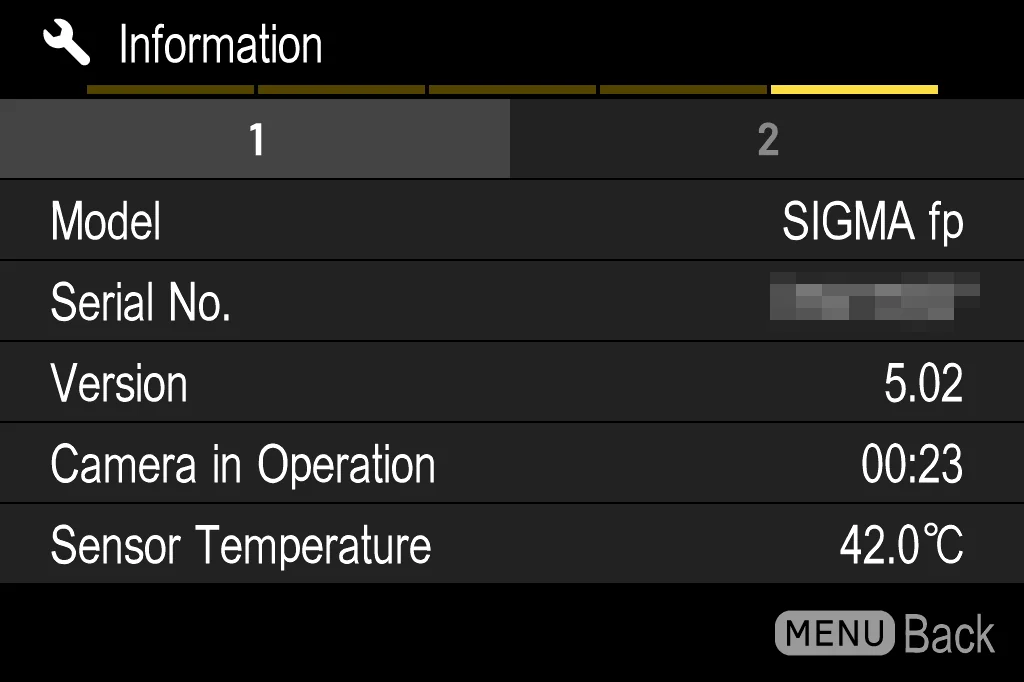
    You need a SIGMA fp with firmware Ver.5.02.

    你需要一台SIGMA fp,韌體是 Ver.5.02。

    To check: MENU → SYSTEM → Information.

    怎麼看:MENU → SYSTEM → Information。
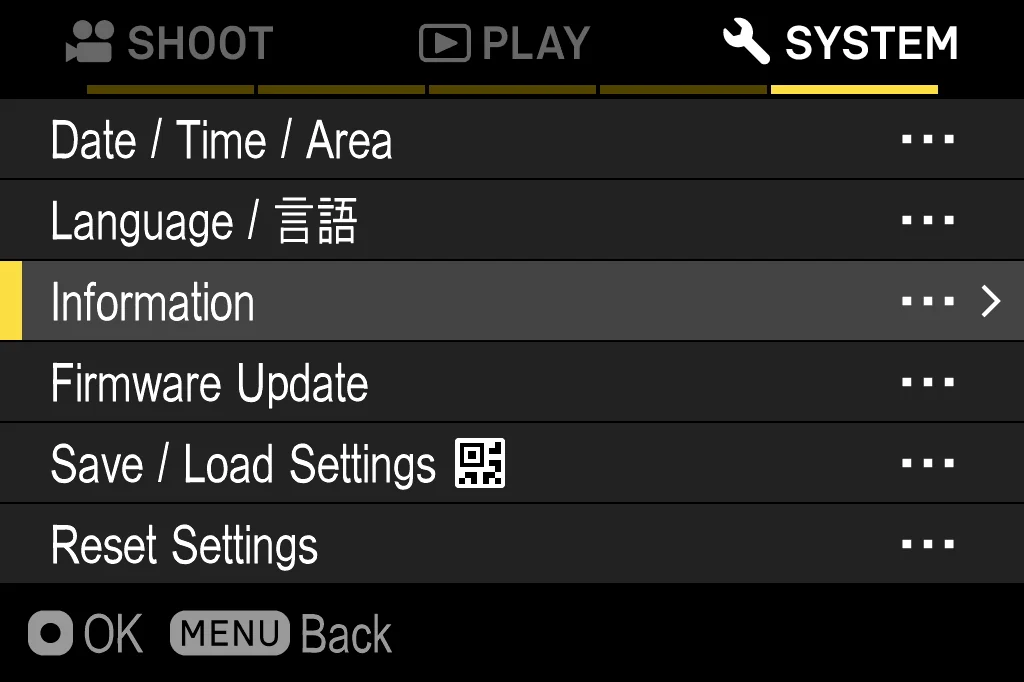
    The SYSTEM tab of the camera menu, with Information highlighted
    In the SYSTEM tab, choose Information. Not “Firmware Update” — that is the item below it, and you do not need it.
    在 SYSTEM 分頁裡選 Information。 不是「Firmware Update」—— 那是它下面那一項,你不需要用到。
    The Information screen showing Model SIGMA fp and Version 5.02
    Version must say 5.02. Model must say SIGMA fp.
    Version 必須是 5.02,Model 必須是 SIGMA fp。
    Both things matter.
    The fp L is a different camera with a different sensor. Nothing here works on it.
    And Ver.5.02 is not a minimum. A card is built for the exact places things sit in Ver.5.02. On any other version it writes to the wrong places, and it can go wrong in bad ways. If your camera is not on Ver.5.02, stop here.
    兩件事都很重要。
    fp L 是另一台相機、另一顆感光元件,這裡的東西在它上面都不能用。
    還有,Ver.5.02 不是最低版本。卡片是照著 Ver.5.02 裡東西所在的確切位置做的, 在其他版本上它會寫到錯的地方,而且可能出很糟的錯。 如果你的相機不是 Ver.5.02,到這裡就停下來。
  2. Choose what goes on the card選擇卡片上要放什麼

    Open fpSup-Merge and tick what you want. It all runs in your browser. Nothing is uploaded and you install nothing. Each product in the list links to its own page; so does the table at the top of this one.

    打開 fpSup-Merge,勾選你要的東西。 全部在你的瀏覽器裡執行,不會上傳任何東西,你也不用安裝任何東西。 清單上每個產品都連到它自己的說明頁,這一頁最上面的表也是。

    Everything you tick goes on one card and works together. This is the only place that can combine them. Do not combine two cards by copying both sets of files yourself. That card will not start.

    你勾的所有東西會放進同一張卡,而且可以一起運作。 這是唯一能把它們合併起來的地方。 不要自己把兩張卡的檔案都複製過去想手動合併 —— 那張卡開不起來。

    Two pairs cannot share a card. OG3K and OG2K both need the camera's third resolution slot. Gyro and Gyro-Base hook the same places in the camera. The page will not let you tick both of a pair.
    有兩組不能放在同一張卡上。OG3K 和 OG2K 都需要相機的第三個解析度欄位; Gyro 和 Gyro-Base 改的是相機裡同樣的地方。那個頁面不會讓你同一組兩個都勾。

    You will also see shell in the Development list. Leave it off. It lets a computer talk to the camera over USB and adds nothing you can use on the camera itself. The setup is in the fp_usb_shell README.

    在 Development 清單裡你還會看到 shell,不要勾它。 它讓電腦透過 USB 跟相機對話,在相機本身上用不到任何東西。 設定方式在 fp_usb_shell 的 README。

    Fast Start 2 (optional)Fast Start 2(可選)

    Under Start-up there is one switch, off by default. With it on, the first start stores the loader in the camera's settings block. After that a power-switch restart loads in about 1.4 seconds without the start-up script, and a cold start runs a short script instead of the full one.

    Start-up 底下有一個開關,預設是關的。打開的話,第一次開機會把載入程式存進 相機的設定區。之後撥電源開關重開,大約 1.4 秒就載入完成、不跑開機腳本; 冷開機則跑一段短腳本,不跑完整的那一份。

    It is the one thing that is kept in the camera. The settings block survives a battery pull and stays when you delete AutoRun.txt. Leave it off unless you want that. Power off with the USB cable unplugged: with it attached, the next start is always a cold one.

    這是唯一會留在相機裡的東西。設定區拔電池也還在, 刪掉 AutoRun.txt 也還在。除非你要這個效果,否則讓它關著。 關機時要拔掉 USB 線:插著線關機,下次一定是冷開機。

  3. Download the card下載卡片

    You get one zip file. Unzip it. Inside are:

    你會拿到一個 zip 檔。把它解壓縮,裡面有:

    AutoRun.txtthe start-up script the camera runs相機開機時執行的腳本
    fpSup.BINeverything you ticked你勾的所有東西
    FPSUPUIa folder: the loading screen一個資料夾:載入畫面
    README.txtwhat is on the card, and its checksums. It does not go on the card.卡片內容與檢查碼。不用放到卡上。

    This is the same no matter how many things you ticked. Nothing else is installed.

    不管你勾了幾項都一樣。沒有別的東西要安裝。

    A card downloaded before 2026-09-26 has only AutoRun.txt and a second file (fpSup.BIN, or VSHL.BIN before 2026-09-19), and shows a text banner instead of the boxes. Those files always travel together; use the set you have, or download a new one.

    2026-09-26 以前下載的卡只有 AutoRun.txt 和第二個檔案 (fpSup.BIN,2026-09-19 以前叫 VSHL.BIN),開機時顯示文字橫幅而不是方格。 這些檔案永遠是一組的,用你手上那一組,或重新下載。

  4. Copy the files to the card把檔案複製到卡上

    Turn the camera off. Take the card out and put it in a card reader.

    關機。把卡拿出來,插進讀卡機。

    Copy AutoRun.txt, fpSup.BIN and the whole FPSUPUI folder to the top level of the card the camera starts from:

    把 AutoRun.txt、fpSup.BIN 和整個 FPSUPUI 資料夾,複製到相機開機用的那張卡的最上層:

    correct正確will not work不會動
    /AutoRun.txt
    /fpSup.BIN
    /FPSUPUI/0.BIN … 4.BIN
    /fpSup/AutoRun.txt
    /DCIM/AutoRun.txt
    /0.BIN (outside the folder)(不在資料夾裡)
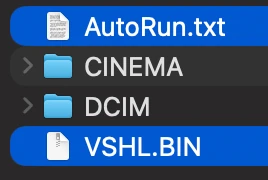
    An SD card opened on a computer: the start-up files at the top level,
              beside the CINEMA and DCIM folders
    The files sit at the top level, beside CINEMA and DCIM. This picture is of an older card; a new one also has the FPSUPUI folder there.
    檔案放在最上層,跟 CINEMA 和 DCIM 並排。 這張圖是舊的卡;新的卡那裡還會多一個 FPSUPUI 資料夾。

    Do not rename anything. Do not convert anything. Check that the small lock switch on the side of the card is not locked. A locked card is the most common reason nothing happens in step 5.

    不要改名字。不要轉換任何格式。檢查卡片側邊那個小鎖扣,確認它沒有鎖上。 卡片被鎖住,是第 5 步什麼都沒發生最常見的原因。

  5. Put the card in and turn the camera on把卡插進去,開機

    Start with the USB cable unplugged. The fpSup logo appears in the top left and four boxes fill one by one. All four white means it is loaded. The camera's own screen comes back two seconds later.

    開機時不要插 USB 線。左上角會出現 fpSup 標誌, 四個方格一個一個填滿。四個都變白就表示載入完成, 兩秒後相機自己的畫面會回來。

    Boxes that stop filling mean the load stopped there. Go to the problems list instead of trying again.

    方格停在一半,表示載入停在那裡。 不要再試一次,去看問題清單。

    This happens every time you turn the camera on, as long as the files are on the card. The camera reads the card and builds it all again in memory each time. With Fast Start 2 on, a power-switch restart shows the four boxes already full at about three seconds, with no filling.

    只要檔案還在卡上,每次開機都會這樣。 相機每次都重新讀卡、在記憶體裡把整套東西再建一次。 開了 Fast Start 2 的話,撥電源開關重開時,大約三秒會直接出現 四個已經填滿的方格,不會一格一格填。

Before you record: the card's speed錄影之前:卡的速度

Open gate and the gyro write to the card while you record. A slow card is the most common reason something here does not work. Each product's page lists the speed it needs. The number printed on a card is often higher than what the camera gets; the storage benchmark measures the real one on the camera.

Open gate 和陀螺儀在你錄影時都會寫卡。 卡太慢是這裡的東西不能用最常見的原因。每個產品頁都列了它需要的速度。 卡上印的數字常常比相機實際拿到的高; 儲存 benchmark 會在相機上量出真實速度。

Use what you loaded使用你載入的東西

Each product works differently: a new resolution in the menu, files next to your clip, or a new row in the COLOR menu. Open its page from the table at the top. If you ticked several, they all work at the same time.

每個產品的用法不一樣:選單裡多一個解析度、片子旁邊多出檔案、或是 COLOR 選單多一列。 從最上面的表打開它的頁面。勾了好幾個的話,它們會同時生效。

Test before you shoot something important. Everything here is still being tested. Each product's page says what was tested and what was not. Record something you do not need, and check it, before you record something you do.
拍重要的東西之前,先測試。 這裡的一切都還在測試中。每個產品頁都寫明哪些測過、哪些沒測。 先錄一段你不需要的東西、檢查它,再去錄你真正需要的。

Removing it移除

First put back any menu setting the card added. The camera remembers menu settings on its own, and deleting the files does not clear them. If the camera is left on an open-gate resolution, or on a row the card added, it is set to something that is no longer there. Each product's page says what to set back.
先把卡片加進來的選單設定改回去。 相機會自己記住選單設定,刪掉檔案不會把它清掉。 如果相機停在 open gate 的解析度、或是卡片加的那一列上, 它就停在一個已經不存在的東西上。每個產品頁都寫了要改回什麼。

Then: delete the files from the card, or take the card out, and switch the camera off. As it powers off, the card writes back every part of the camera's memory it changed, so the camera is back to normal. Nothing was written to the camera's flash, unless you turned on Fast Start 2.

然後:把卡上的檔案刪掉,或是把卡拿出來,然後關機。 相機關機時,卡片會把它改過的每一處記憶體寫回原狀,所以相機就恢復正常了。 除非你開了 Fast Start 2,否則相機的 flash 裡沒有被寫入任何東西。

Did you already do it in the wrong order? Nothing is broken. Put the card back with its files, turn the camera on so the setting exists again, set it back to a normal one, and then remove the files. The setting is only a problem while the code behind it is missing.
已經照錯的順序做了?沒有東西壞掉。 把帶著檔案的卡插回去、開機讓那個設定重新存在、改回正常的、然後再移除檔案。 那個設定只有在背後的程式碼不見時才會是問題。

If something does not work如果有東西不能用

These apply to every card. Problems with one product — no new resolution, no motion files, a strange picture — are in the table on that product's page.

這些適用於每一張卡。某個產品自己的問題 —— 沒有新解析度、沒有運動檔、畫面怪怪的 —— 在那個產品頁的表裡。

what happens發生什麼what to do怎麼辦
Nothing appears on the screen螢幕上什麼都沒出現 The card did not run. Check the file is called AutoRun.txt and is at the top level of the card. Check the lock switch on the card is off.卡片沒有執行。確認檔案名稱是 AutoRun.txt、而且在卡的最上層。 另外確認卡片上的鎖扣是關的。
The logo appears but no boxes出現標誌,但沒有方格 The FPSUPUI folder is missing or not at the top level. Copy the whole folder from the zip.FPSUPUI 資料夾不見了,或不在最上層。從 zip 裡把整個資料夾複製過去。
The boxes stop filling方格停在一半 The load stopped there. Download the card again instead of reusing it. Tell us on Discord how many boxes filled.載入停在那裡。 重新下載一張卡,不要沿用原本那張。到 Discord 告訴我們填到第幾格。
It loaded but nothing changed載入了,但什麼都沒變 Check where you are looking: each product changes a different place. Its page says where.先確認你在看哪裡: 每個產品改的地方不一樣,它的頁面有寫在哪裡。
Recording stops after a few seconds錄影幾秒後就停了 The card is too slow. See above, and the speed on the product's page.卡太慢。見上面, 以及產品頁上需要的速度。
You removed the files and now recording is wrong你把檔案刪了,現在錄影不正常 A setting is still pointing at something that is gone. Put the card back, set it back to a normal one, then remove it again — Removing it.有一個設定還指著已經不存在的東西。 把卡插回去、改回正常的、然後再移除一次 —— 移除。
The camera does not respond at all相機完全沒反應 Unplug the USB cable, then take the battery out. The next start is clean.先拔掉 USB 線,再把電池拿出來。 下一次開機就是乾淨的。

Still stuck? Ask on the Discord · YouTube. Tell us which products you ticked, whether Fast Start 2 was on, your firmware version, and how far the boxes filled.

還是卡住?到 Discord · YouTube 上問。
告訴我們你勾了哪些產品、有沒有開 Fast Start 2、你的韌體版本,以及方格填到第幾格。