Mac needs one extra step because the plugin is not notarized by Apple. It installs next to the
official Gyroflow plugin; you can keep both. Tested on Apple-silicon Macs only.
Mac 多一步是因為外掛沒有經過 Apple 公證。它跟官方 Gyroflow 外掛並存,兩個都可以留著。
只在 Apple 晶片的 Mac 上實測過。
Restart Resolve. In Preferences → Video Plugins,
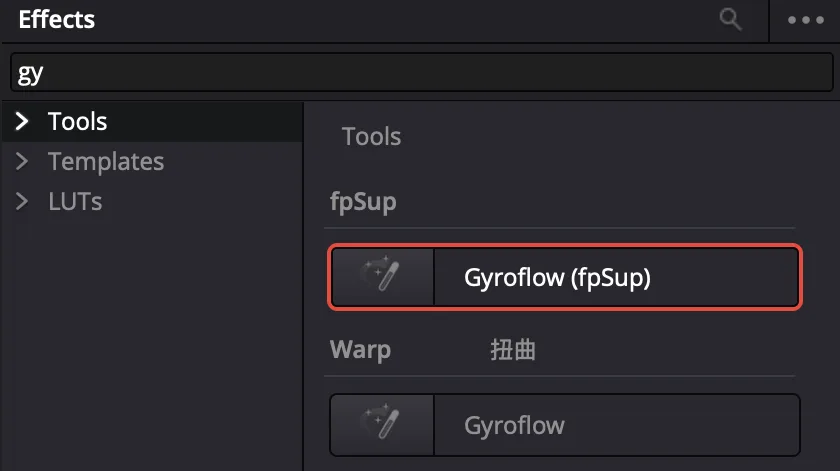
fpSupGyroflow.ofx.bundle must be ticked. In Effects → OpenFX it is in the
fpSup group as Gyroflow (fpSup).
Gyroflow (fpSup) in its own fpSup group; the official Gyroflow stays under Warp.Gyroflow (fpSup) 在自己的 fpSup 分組;官方 Gyroflow 還在 Warp 底下。
Use使用
Record CinemaDNG錄 CinemaDNG
Record as usual. Nothing new appears on the card: the data is inside the frames.
照平常錄。卡上不會多出任何檔案:資料就在畫面檔裡面。
Add the effect in Resolve在 Resolve 加上效果
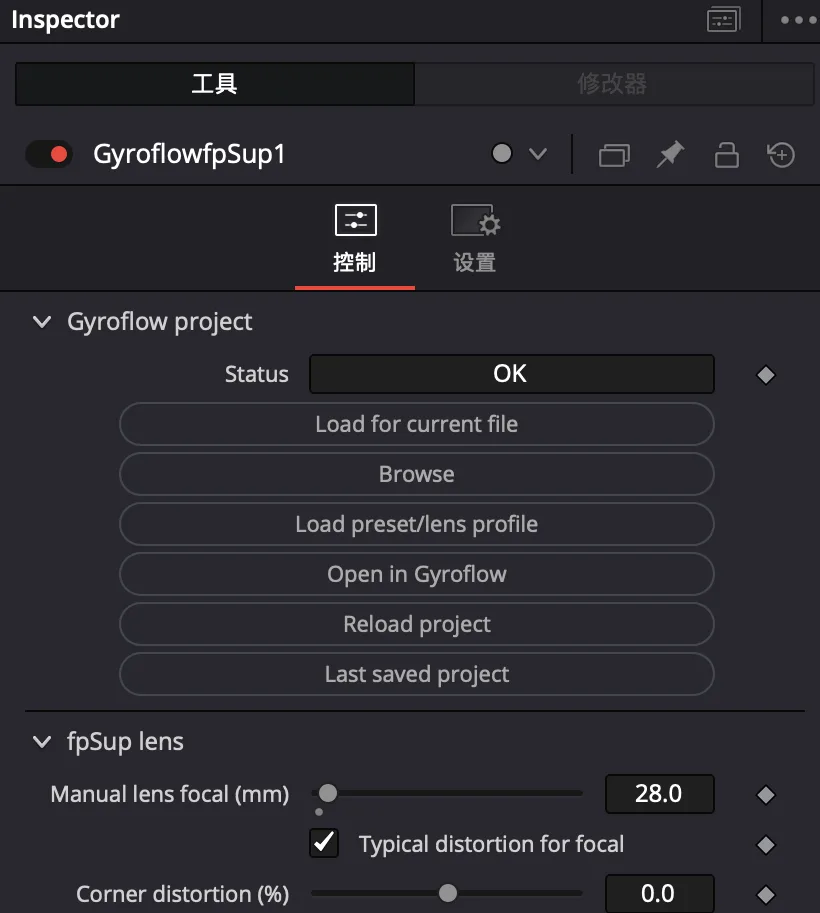
Put the clip on the timeline and add Gyroflow (fpSup). It finds the gyro
data by itself; Status turns OK. Then set Smoothness and Zoom limit
under Adjust parameters to taste.
Status OK means the gyro data was found. The fpSup lens group is for manual lenses.Status 顯示 OK 就代表找到陀螺資料。fpSup lens 群組是給手動鏡頭用的。
The rolling-shutter time, the lens (focal length, distortion, focus) and the
frame timing all come from the frames. There is nothing to sync and no lens profile to load.
果凍效應時間、鏡頭(焦距、畸變、對焦)和每格的時間都從畫面裡來。
不用同步,也不用載入鏡頭檔。
A manual lens手動鏡頭
A lens without electronic contacts gives the camera no lens data. In the
fpSup lens group, set Manual lens focal (mm) to its focal length. Leave
Typical distortion for focal on; if straight lines near the edges still bend or
wobble, turn it off and set Corner distortion (%) by eye (negative = barrel).
If you have a Gyroflow lens profile for it, Load preset/lens profile loads it instead.
What the plugin hands to Gyroflow外掛交給 Gyroflow 的資料
The plugin turns what the camera wrote into Gyroflow's own camera format
(Gyroflow Protobuf), the same one cameras with
built-in Gyroflow support use. What goes in:
gyroscope, every sample (2499.5 Hz)陀螺儀,每一筆樣本(2499.5 Hz)
the camera's gyro相機的陀螺儀
the camera's motion: what gets undone相機的轉動:要抵銷的就是它
accelerometer加速度計
the camera's level sensor (about 45 a second)相機的水平儀(每秒約 45 次)
which way is down: horizon lock哪邊是下:水平鎖定
each frame's start and end time每一格的開始與結束時間
the sensor's frame clock (Vd)感光元件的幀時鐘(Vd)
lines motion up with the picture — no sync step讓動作跟畫面對齊 —— 不用同步
readout time and direction讀出時間與方向
the sensor mode (e.g. 12.4 ms in Open Gate 3K)感光元件模式(例如開放片幅 3K 為 12.4 ms)
rolling-shutter (jello) correction果凍效應修正
exposure time, ISO曝光時間、ISO
each DNG每張 DNG
places the motion at the middle of the exposure把動作對到曝光的中間
lens: focal length, focal length in pixels, distortion, aperture, focus distance — per frame鏡頭:焦距、像素焦距、畸變、光圈、對焦距離 —— 每一格
the camera's own correction data for the mounted lens; a manual lens: your settings相機對掛上鏡頭的校正資料;手動鏡頭:你填的設定
turns rotation into the right amount of picture movement, and follows a focus pull把轉動換算成正確的畫面位移,拉焦時也跟著變
sensor size, pixel pitch, crop, frame size and rate感光元件尺寸、像素間距、裁切、畫面尺寸與幀率
the recording mode錄影模式
the geometry of the frame畫面的幾何
camera and lens names機身與鏡頭名稱
each DNG每張 DNG
shown in Gyroflow在 Gyroflow 裡顯示
Not included: orientation already worked out by the camera (Gyroflow computes it
from the gyro), and what the camera's electronic stabiliser or a lens's optical stabiliser did
— that is not recorded, so turn both off when you shoot for Gyro2.
In the plugin's fpSup plugin group: Check for update, then Install.
The download runs in the background (about a minute) while Resolve keeps working; press Install
once. Type a version in Version to install (e.g. 0.1.2) to install that one, older
ones too. Roll back puts the previous installation back without the network. Restart Resolve
afterwards; the Update status line then shows the result.
在外掛的 fpSup plugin 群組:按 Check for update,再按 Install。
下載在背景進行(約一分鐘),Resolve 可以繼續用;Install 按一次就好。
在 Version to install 填版本(例如 0.1.2)就安裝那一版,舊版也可以。
Roll back 不用網路就能退回上一個安裝。做完重開 Resolve,Update status 會顯示結果。
What is tested and what is not哪些測過、哪些沒有
tested測過
not tested yet還沒測
Open Gate 3K and 2K, 29.97p, with Lossless on開放片幅 3K 與 2K,29.97p,開 Lossless
FHD, UHD, 59.94p, 120p with this version這一版的 FHD、UHD、59.94p、120p
An electronic lens (LUMIX S 40mm F2) and a manual lens (Nokton 28mm F1.4)電子鏡頭(LUMIX S 40mm F2)與手動鏡頭(Nokton 28mm F1.4)
Takes longer than a few minutes超過幾分鐘的長錄影
The plugin on DaVinci Resolve 21, Apple-silicon Mac外掛在 DaVinci Resolve 21、Apple 晶片 Mac
The plugin on Windows外掛在 Windows
Known limits已知限制
Hand-held close-ups (under about 1 m): the lens also moves sideways, which a
gyro cannot see, so some shake stays.
手持拍近物(約 1 公尺內):鏡頭同時在平移,陀螺量不到,會留一點晃。
Fast shake at a slow shutter leaves motion blur that no stabilisation can remove.
慢快門下的快速晃動會有動態模糊,防震修不掉。
Strong shake with a low Zoom limit: the plugin keeps some motion so the frame
edge never shows. Raise Zoom limit for a steadier, tighter picture.
If the camera skips frames while recording, Resolve splits the clip; each part
stabilises on its own.
錄影時相機若跳幀,Resolve 會把片子分成兩段,各段各自防震。
Remove移除
Camera: delete fpSup/40GYR2.BIN from the card (or the whole fpSup card),
then switch the camera off. There is no menu setting to set back. Plugin: delete
fpSupGyroflow.ofx.bundle from the plugin folder and restart Resolve.
No Gyroflow (fpSup) in Effects特效裡沒有 Gyroflow (fpSup)
Check the bundle's folder, tick it in Preferences → Video Plugins, restart Resolve.
On a Mac, reinstall with the Terminal tab above.確認外掛放的資料夾、在偏好設定 → Video Plugins 打勾、重開 Resolve。
Mac 可以改用上面的終端機安裝重裝一次。
Status says the take has no Vd frame syncStatus 說這段沒有 Vd 幀同步
The clip was not recorded with Gyro2 loaded (or with an early test build). Check the
card has fpSup/40GYR2.BIN and record again.這段錄的時候沒有載入 Gyro2(或是早期測試版錄的)。
確認卡上有 fpSup/40GYR2.BIN,重錄。
Status says unsupported block version 2Status 說 unsupported block version 2
The clip was recorded with Gyro2 v0.2.0 or later, which needs plugin v0.1.10 or later.
Update the plugin, then quit and reopen Resolve.這段是用 Gyro2 v0.2.0 以後的版本錄的,需要 v0.1.10 以上的外掛。
更新外掛,然後把 Resolve 整個關掉再打開。
The picture bends near the edges with a manual lens手動鏡頭時畫面邊緣彎曲
Set Manual lens focal correctly, then adjust Corner distortion —
Use.把 Manual lens focal 填對,再調 Corner distortion ——
見使用。
Resolve closes when you add the effect加上效果時 Resolve 關掉
Update the plugin, or Roll back. Send the file
~/Library/Application Support/Gyroflow/gyroflow-openfx.log to the Discord.更新外掛或 Roll back。把
~/Library/Application Support/Gyroflow/gyroflow-openfx.log 傳到 Discord。
The camera does not respond at all相機完全沒反應
Unplug USB and take the battery out. Nothing is flashed.拔掉 USB、把電池拿出來。沒有任何東西被燒錄。