Records CinemaDNG losslessly compressed by the camera's own hardware codec, which the stock firmware never uses for video. A 3K 12-bit frame of 9.1 MB typically becomes about 3.2 MB. Not a single pixel value changes. Version v0.2.0test — a test build.
用相機自己的硬體編碼器錄無損壓縮的 CinemaDNG(原廠韌體從不拿它錄影)。 一張 9.1 MB 的 3K 12-bit 畫格通常變成約 3.2 MB,像素值一個都不變。 版本 v0.2.0test —— 這是測試版。
Thanks致謝
CorNy found that DaVinci Resolve plays a clip mixing compressed and uncompressed frames without flickering only when its first frame is uncompressed. So every take now keeps its first frame uncompressed — and mixed clips play cleanly in Resolve.
CorNy 發現:壓縮與未壓縮畫格混合的片段,只有在第一格是未壓縮時, DaVinci Resolve 才能正常播放、不會閃爍。所以現在每段拍攝的第一格都保留未壓縮 —— 混合片段在 Resolve 裡就能乾淨地播放。
Tick fpSup-Lossless in fpSup-Merge, download, and put it on the card as the install instructions on that page say.
在 fpSup-Merge 勾選 fpSup-Lossless 下載,照 頁上的安裝說明放進卡。
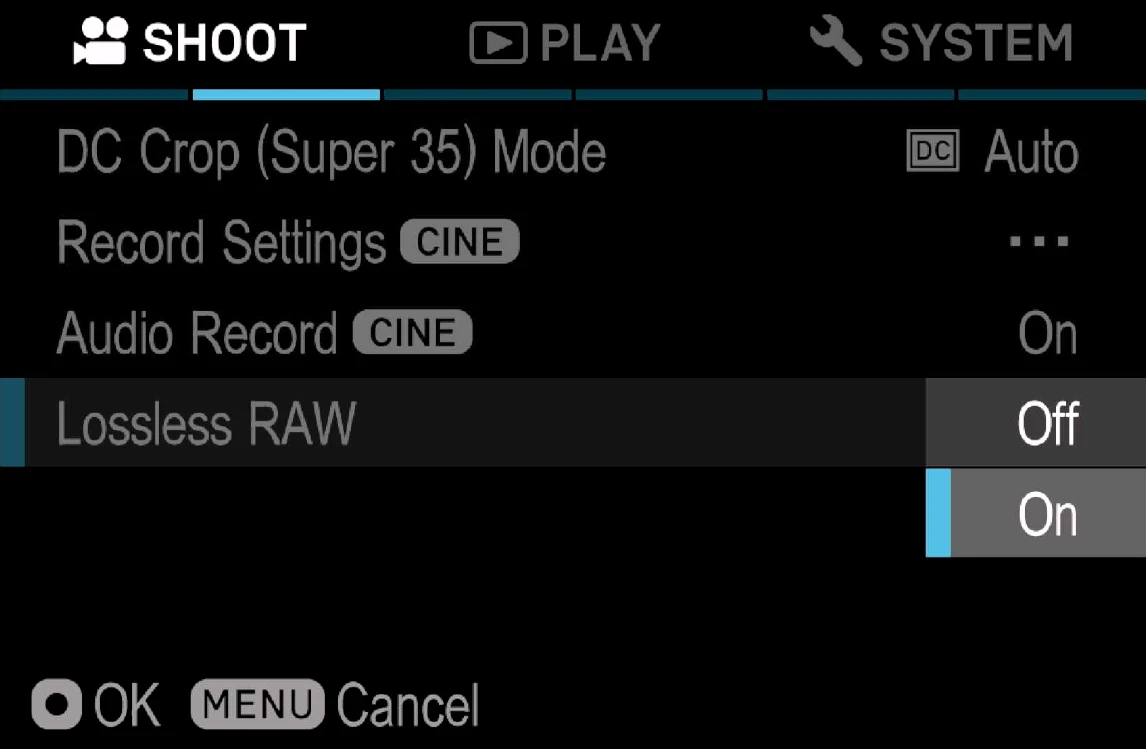
Open MENU → SHOOT, page 2 (CINE). Below Audio Record there is a new row, Lossless RAW: set it to On, then record CinemaDNG as usual.
打開 MENU → SHOOT 第 2 頁(CINE)。在「錄音」下面多了一列 Lossless RAW:設成 On,然後照平常錄 CinemaDNG。
\fpSup\10LOSS.BIN), never in the camera's settings.預設是 Off。
你的選擇會存在卡上 fpSup-Lossless 自己的檔案裡(\fpSup\10LOSS.BIN),關機後保留;
相機設定裡不存任何東西。v0.1.3test reduces the memory used when loading the Lossless menu. The reported 100p + 10-bit + Lossless freeze is still being investigated; this build has not been tested on a camera at that setting.
v0.1.3test 減少載入 Lossless 選單時的記憶體使用量。100p + 10-bit + Lossless 凍結的回報仍在調查中;這個版本尚未在相機上以該設定實測。
| tested on the camera已在相機上測過 | not tested沒測過 |
|---|---|
| 3K (OG3K) 12-bit 29.97p to SD, several 10–15 s takes: 512×512 tiles, about 92% of frames compressed, no stall.3K(OG3K)12-bit 29.97p 寫 SD, 多段 10~15 秒:512×512 tile,約 92% 的畫格被壓縮,沒有卡住。 | In-camera playback and DaVinci Resolve with the new 512×512 tiles.新的 512×512 tile 在機內回放與 DaVinci Resolve 中的表現。 |
| FHD 29.97p to SD with several tile sizes: every frame after the first compressed, no stall.FHD 29.97p 寫 SD、試過多種 tile 大小:第一格之後每一格都被壓縮, 沒有卡住。 | UHD, 10-bit, and frame rates not listed here.UHD、10-bit,以及這裡沒列的格率。 |
| The 94-frame stop is fixed: FHD 24p and 59.94p takes of 771 and 1954 frames, all compressed.94 格就停的問題已修正:FHD 24p 與 59.94p 錄了 771 與 1954 格,全部壓縮。 | Long SD takes past the camera's own auto-stop.超過相機自動停止時間的長時間 SD 錄影。 |
| Loading, the menu row, ON/OFF remembered across restart, Lossless together with OG3K on one card; a 512×512-tile 3K frame decodes on a computer to the full 3024×2010 picture.載入、選單列、開關重開後仍保留、與 OG3K 同卡; 512×512 tile 的 3K 畫格在電腦上解出完整的 3024×2010 畫面。 | Saving the setting right before switching the camera off; the 100p + 10-bit + Lossless freeze report; this release folder copied onto a fresh card as-is.改完設定馬上關機時是否存得到; 100p + 10-bit + Lossless 的凍結回報;把這個發行資料夾原樣複製到新卡。 |
| Older card layout (v0.1.2test): 3K 12-bit 48p to an SSD for 15 minutes, and compressed clips playing back in the camera.舊卡片格式(v0.1.2test):3K 12-bit 48p 寫 SSD 15 分鐘, 以及壓縮片段在機內回放。 |
Nothing to undo first: Lossless saves no setting. Delete the files (or take the card out) and switch the camera off. More on removing.
不用先改回什麼:Lossless 不存任何設定。刪掉檔案(或拔卡),然後關機。 移除的詳細說明。
| what happens發生什麼 | what to do怎麼辦 |
|---|---|
| No Lossless RAW row in the SHOOT menuSHOOT 選單沒有 Lossless RAW | The card did not load. Check that all four boxes turned white at start-up; see general problems.卡沒有載入。 確認開機時四格都變白;見一般問題。 |
| Files are as big as before檔案跟以前一樣大 | Lossless RAW is Off again after every power-on. Set it to On.每次開機 Lossless RAW 都回到 Off。把它設成 On。 |
| Some frames are big, some small有些畫格大、有些小 | Expected: frames the codec could not finish in time are written uncompressed.正常:編碼器來不及壓的畫格會寫成未壓縮。 |
| The camera does not respond相機沒反應 | Take the battery out (USB unplugged). Bring what you saw to the Discord.把電池拿出來(不插 USB 線)。 把你看到的情況帶到 Discord。 |